Excel Household Budget Planner [2026]
An Excel household budget planner helps you keep track of your income and expenses in a clear and structured way and makes financial planning easier. The Excel template presented here combines a central overview with detailed monthly views and various analysis options.


Workbook Structure, Features & Guide
The household budget planner combines multiple integrated and synchronized worksheets within a single Excel file. It was designed for Microsoft Excel. The .xlsx file can generally also be opened with other spreadsheet software, such as Google Sheets.
-
Workbook Structure
The template consists of 15 integrated and synchronized worksheets, including a central dashboard for managing and reviewing your budget, 12 detailed monthly worksheets (Jan–Dec), and a dedicated chart sheet for visual summaries. Additionally, an introductory worksheet provides an overview of the main features along with step-by-step instructions to help users get started with the household budget planner. -
International Compatibility
Choose from 12 display currencies and use 6 language options for month dropdowns.Important Note on Formatting:
Examples shown on this page reflect my local system settings using decimal commas. Excel will typically adapt number formats automatically to match your regional settings. For example, users in the United States generally see values such as $1,234.50, while many European users see formats like 1.234,50 €. Simply enter values using your usual local decimal separator. Excel will interpret and display them correctly based on your system settings. -
Flexible Income and Expense Tracking
The template provides customizable areas for tracking both income and expenses, including:- 9 Income Sources: One primary income source and up to eight additional income streams, suitable for secondary employment, freelance work, or other sources of income.
- 8 Flexible Expense Categories: Track variable expenses that may change from month to month.
- 40 Recurring Expenses: Manage fixed costs and recurring payments throughout the year with customizable amounts and payment intervals.
-
Smart Syncing
Simply set the year, and the workbook automatically synchronizes dates and related fields throughout the entire template. -
Dynamic Monthly Comparisons
Analyze fixed and variable expenses as a percentage of your total income. The main dashboard allows you to switch between months and compare how spending and income ratios change over time. -
Charts and Visual Summaries
Use bar charts to monitor monthly and yearly income, expenses, and balances at a glance. -
Category-Based Expense Analysis
Review variable expenses by category to identify spending patterns and better understand where your money goes throughout the month and year. -
Flexible and Customizable
The template can be used immediately or adapted to suit your individual budgeting needs.
The "Main" Worksheet: Overview and Central Management
The "main" worksheet serves as the central overview of the household budget planner. It provides summaries of monthly and annual income, expenses, and balances, helping you monitor your financial situation over time. In addition, several settings and recurring financial items can be managed directly from this worksheet.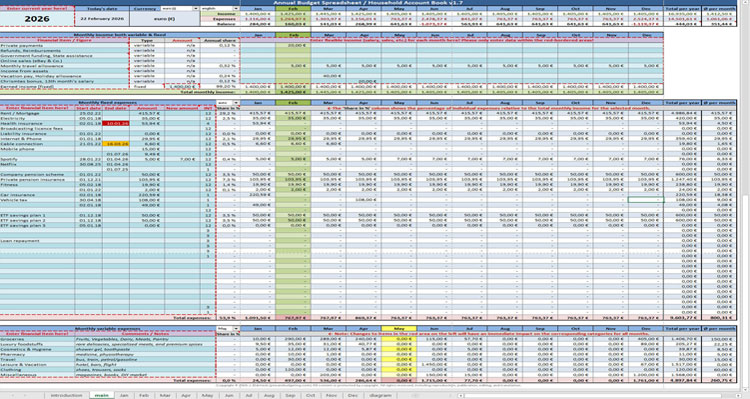
Note: Separators (comma vs. period) are displayed in European format (1.234,50 €).
Your Excel will automatically convert this to your local format (e.g., $1,234.50).
Global Settings: Currency & Year Adjustment
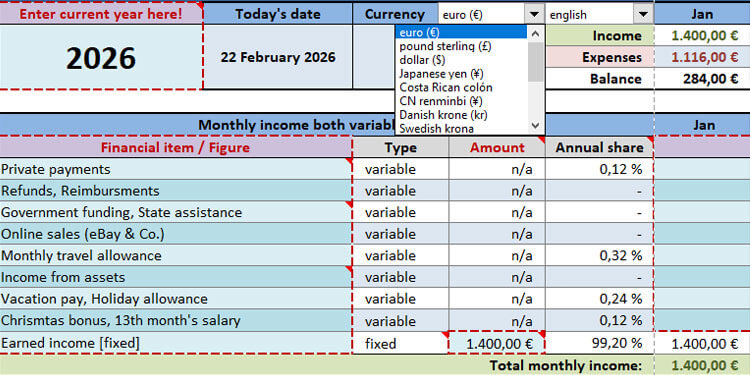
The upper-left section of the "main" worksheet contains global settings that apply across the entire workbook. These settings allow you to adapt the template to your individual requirements.-
Calendar Year Selection
Simply change the current year, and all relevant dates and date-dependent fields throughout the workbook update automatically. This allows the household budget planner to be reused in future years without additional adjustments. -
Currency Selection
Choose the currency that best matches your requirements from 12 available options: € (Euro), £ (Pound), $ (Dollar), ¥ (Yen), kr (Krone), CHF (Franc), Ft (Forint), ₹ (Rupee), ₽ (Ruble), zł (Zloty), lei (Leu), and ₡ (Colón).Important Note:
Currency selection affects formatting and display only. The workbook does not perform automatic currency conversions on entered values. -
Workbook-Wide Application
Changes to the selected year and currency format are automatically applied throughout the workbook, ensuring a consistent presentation of financial data across all relevant worksheets.
Dynamic Monthly Analysis
The "main" worksheet allows you to analyze both fixed and variable expenses on a monthly basis using integrated dropdown menus.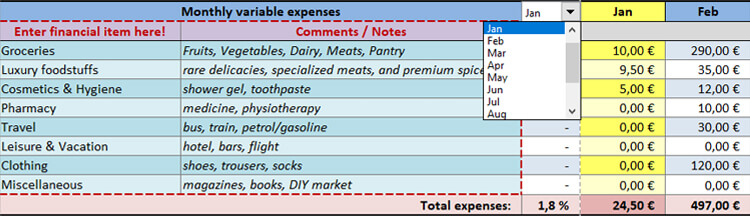
-
Month Selection
Switch between different months to review how expenses and income ratios change over time. -
Percentage-Based Expense Analysis
The 'Share in %' column automatically displays the percentage share of each expense category in relation to your total monthly income. -
Visual Indicators
The selected month is highlighted automatically. The current month appears in green, while other months are shown in yellow. -
Fixed and Variable Expenses
Percentage-based analyses are available for both fixed and variable expenses, making it easier to understand how different spending categories affect your monthly budget. -
Automatic Updates
Changes made in the monthly worksheets are automatically reflected on the "main" dashboard, ensuring that analyses and percentage-based calculations always remain up to date.
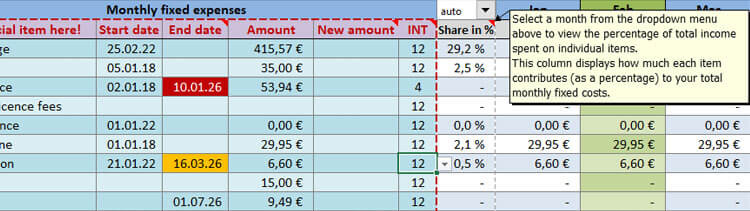
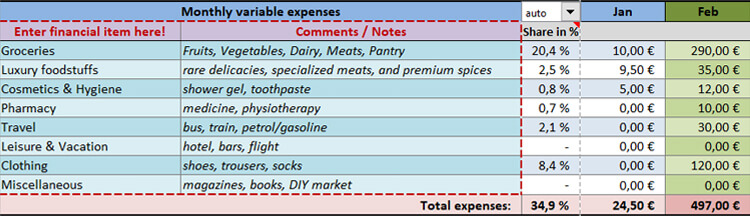
Customizing Expense Categories
Expense categories for both fixed and variable expenses can be adapted to suit individual budgeting needs.-
Automatic Synchronization
Changes made to categories on the "main" worksheet are automatically reflected across all monthly worksheets. -
Consistent Data Entry
Customized categories automatically appear as column headers in all monthly worksheets, ensuring a consistent approach to recording expenses throughout the workbook.
Note:
Defining categories on the "main" worksheet before entering monthly expenses ensures that category names remain consistent across all worksheets.
Recurring Expenses and Payment Intervals
Manage up to 40 recurring expenses directly from the "main" worksheet. Payment intervals and effective dates can be customized individually.-
Payment Frequency:
- Use the "INT" column to define how often a payment occurs throughout the year.
- 12 – Monthly
- 6 – Every 2 months
- 4 – Quarterly
- 3 – Every 4 months
- 2 – Every 6 months
- 1 – Annually
-
Automatic Distribution:
Based on the selected interval and start date, recurring expenses are distributed automatically throughout the year.
Adjusting Recurring Expenses During the Year
Recurring expenses that change during the year can be updated without affecting previous entries.- Specify an 'End date' for the existing amount.
- Enter the revised amount using the 'New amount' field.
- The updated amount is applied automatically from the specified date onward according to the selected payment interval.
- Leave the 'End date' empty if the current amount continues indefinitely.
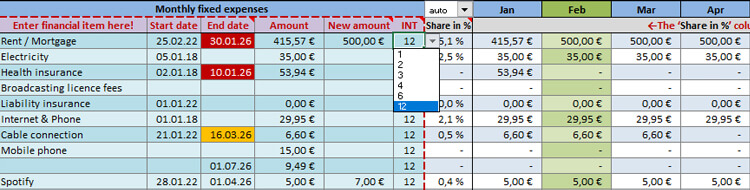
Example: Adjusting a Recurring Expense During the Year
Imagine your monthly rent increases from 415.57 € to 500.00 € starting after January 2026.
To keep your annual forecast 100 % accurate, here is how you enter it:
| Category | 'Amount' | 'Start date' | 'End date' | 'New amount' | 'INT' |
|---|---|---|---|---|---|
| Rent | 415.57 € | 25-Feb 2022 | 30-Jan 2026 | 500.00 € | 12 |
- By setting the 'End date' to a day in January, the system knows to stop the 415.57 € payment after January.
- By entering a new amount in the column 'New amount', the system automatically applies 500.00 € for the remainder of the year.
- Automatic Transition: Even if the 'End date' falls near the end of a month, the updated amount is applied automatically from the beginning of the following month.
- Result: Your "main" dashboard will correctly show a total annual rent of 5,915.57 € (415.57 € for Jan + 500.00 € for Feb–Dec).
Monthly Detail Sheets: Jan–Dec
The workbook includes 12 individual worksheets—one for each month of the year. These sheets allow you to record variable expenses as they occur and provide a detailed overview of your daily spending patterns. To support data entry, the current day is highlighted automatically.
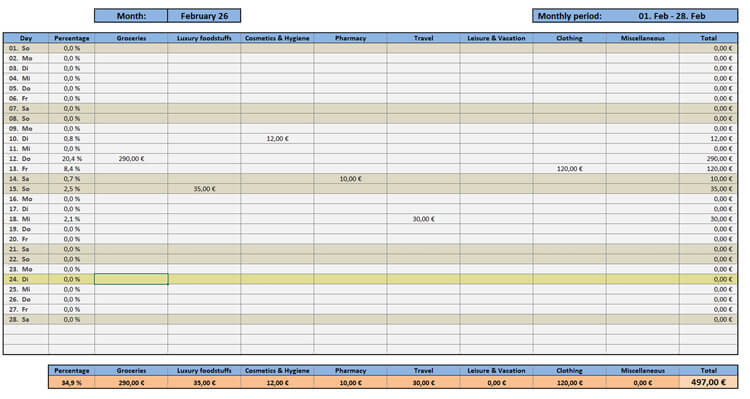
Customizing Flexible Expense Categories
Flexible expense categories can be adapted to reflect your individual budgeting needs.-
Automatic Synchronization:
Changes made to category names on the "main" worksheet are automatically reflected across all monthly worksheets. Categories only need to be customized once.
Percentage-Based Daily Expense Analysis
-
Percentage-Based Evaluation:
The second column displays daily expenses as a percentage of your monthly income, helping you understand how individual spending categories contribute to your overall budget. -
Automatic Updates:
Totals and percentage values update automatically as new entries are added, providing an up-to-date overview of your spending patterns.
Automatic Calculations and Synchronization
Entries made in the monthly worksheets are automatically reflected in the "main" worksheet.-
Automatic Calculations:
Monthly and annual totals, averages, and related analyses are updated automatically throughout the workbook. -
Central Overview:
Return to the "main" worksheet at any time to review total expenses, income, balances, and other financial summaries.
Visual Financial Analysis: The "Charts" Dashboard
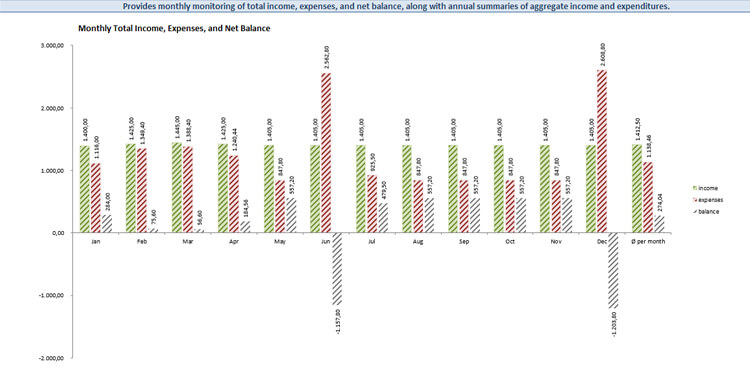
The dedicated "diagram" worksheet transforms financial data into a clear graphical overview. Bar charts provide visual summaries of income, expenses, and balances, helping you identify trends and monitor the development of individual budget categories throughout the month and across the entire year.Budget Chart 1 – Monthly and Annual Spending by Category
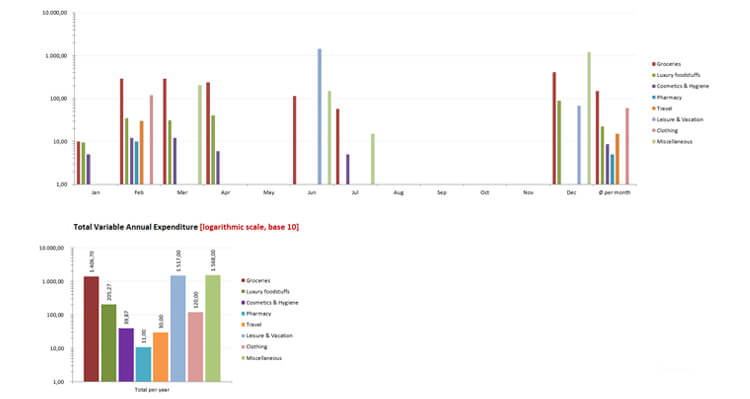
Budget Chart 2 – Income, Expenses, and Balances
Calculation Logic & Financial Insights
The workbook uses different calculation methods for current and previous periods, as well as for fixed and variable expenses.
Annual Averages and Total Income
- Current Year: Averages are calculated using only the completed months so far.
- Previous Years: Averages are based on all 12 months.
- Yearly Totals: Income and expenses are summarized for the entire year.
Fixed and Variable Expense Calculations
- Fixed Expenses: Annual averages are based on a full 12-month cycle.
- Variable Expenses: Averages are based on actual spending recorded from the beginning of the year up to the current month.
- Total Overview: Both expense types are combined to provide an overview of current financial outflow.
Balance Overview and Calculations
- Monthly Balance: The difference between income and expenses for the month.
- Year-to-Date Balance: The cumulative sum of monthly balances for the current year.
- Average Balance: The average monthly balance based on the available data.
Summary
The Excel Household Budget Planner combines detailed expense tracking, automated calculations, visual analyses, and long-term usability within a single workbook. Thanks to synchronized worksheets and flexible configuration options, the template can be adapted to different financial situations and reused year after year. Simply update the calendar year to automatically synchronize date-dependent fields and continue using the workbook in future years without additional adjustments.You can find further information in the Excel Household Budget Planner FAQ.